Swiftlight offers a unique blend of a practical planning structure, high-quality “PowerPoint-like” graphics, and outstanding ease of use. Easier, less detailed and cheaper than Microsoft Project, and faster and more structured than using Excel or PowerPoint for planning, Swiftlight helps you to get organised, communicate clearly and save time in the process.
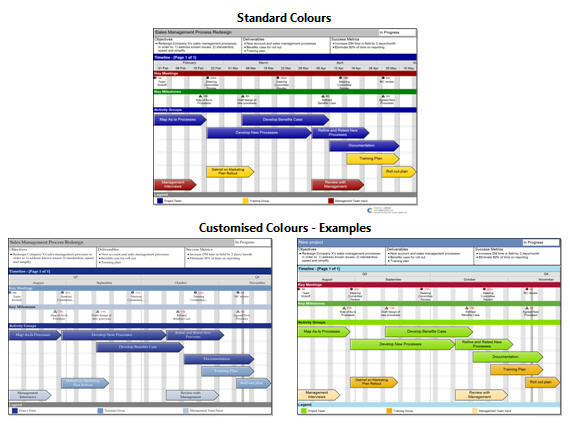
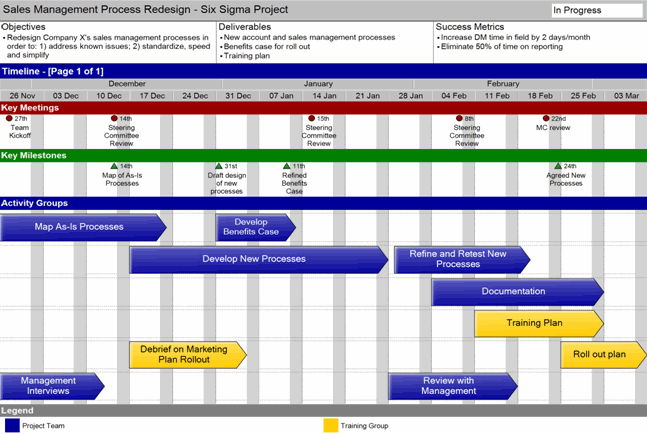
Our customers love Swiftlight’s visually appealing and flexible Timeline View since it helps them easily develop and communicate great-looking, high level plans, as illustrated in the example below:
An Example Timeline Output from Swiftlight
To see other timeline examples, click here!
Swiftlight provides 8 different “views” on your project, allowing you to plan at a high level (e.g. focusing on project objectives and the timeline) and also to plan at a more detailed level (e.g. creating to-do lists by activity), when you need. You can choose to use one, some or all of these views as suits the needs of your project and your working style.
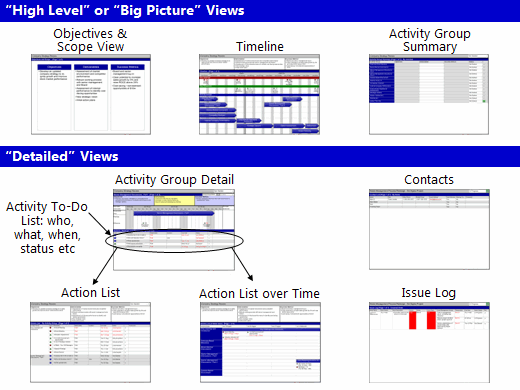
To find out more about all of Swiftlight’s views, please take the product tour.
The first thing our customers talk about is ease of use. With Swiftlight’s intuitive drag-and-drop interface and simple navigation, getting going is incredibly easy. Combine this with our free “3 minute” video tutorials and other support resources, and you’ll find there is no need for in-depth training. To see for yourself, why not get a free 30 day trial?
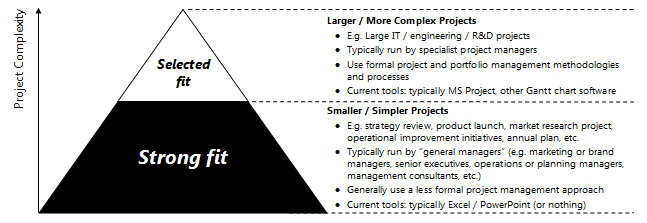
Swiftlight is designed to meet the needs of “general managers” (e.g. marketing or brand managers, senior executives, operations or planning managers, management consultants etc), as well as specialist project managers. In terms of project type, Swiftlight is particularly well suited to smaller, simpler “management” projects, rather than large IT / engineering projects, as illustrated in the graphic below:
Where does Swiftlight fit in the Project Pyramid?
“General managers“, for whom traditional project management software is often too complex and who may be using MS Excel and PowerPoint instead, find that Swiftlight is straight-forward and well suited to their needs. It provides a practical structure that is focused on the fundamentals, clear presentation-ready outputs, and it is 3 times faster than their existing tools – saving hours of precious time.
For specialist project managers, Swiftlight is not intended to be a direct replacement for MS Project (or similar tools) on larger, more complex projects. However, these specialist project managers and other users of MS Project find that Swiftlight is great in a number of situations:
Swiftlight’s overall design is based on a practical planning philosophy, best practice project management principles and a belief in keeping things simple. We believe in:
Swiftlight’s features include:
| As a project management tool | To create a timeline for anything | For the “big picture” view of a portfolio of projects | As a management tool | As an additional planning and communication tool |
|---|---|---|---|---|
| … for projects that are smaller and less complex than big IT / engineering projects. | – be it a project, a proposal, your annual plan … | e.g. in a Program Office. | … to visualize and track all of your activities and “to-dos”. | … alongside more complex project management software. |