The Easy Project Timeline Software - Swiftlight

Project Timelines Examples

The Easy Project Timeline Software

Swiftlight. Create project timelines with exceptional ease and speed. Less detailed, more visual and easier to use than Microsoft Project, and faster than using Excel or PowerPoint, Swiftlight is a fast and effective tool for planning and communicating your project timelines and plans.

Save Time. Create Clarity. Get Results. Swiftlight is different. Designed for general business users not just specialist project managers, it is a project management tool and a communication tool in one. Fast, Simple, Clear

Watch Overview Video

How To Create a Project Timeline in 3 Minutes --->

Get a Free Trial

Get a FREE 30 Day Trial --->


Exceptionally Easy Project Timeline Software

Less detailed, more visual and easier than MS Project, and faster and more structured than using Excel or PowerPoint, Swiftlight helps you create project timelines with ease and speed. Don't take our word for it. PC World said "creating and tracking a project is exceptionally easy, because the interface is simple and clean". We couldn't have said it any better ourselves.


See the "Big Picture" with Swiftlight's Visual Project Timelines

Our customers love Swiftlight's simplicity, ease of use and, in particular, its visually appealing and flexible project timelines. To see why, look at the examples below:

Project Timeline 1: an example Swiftlight Timeline showing project goals and meetings, milestones and activities over 3 months
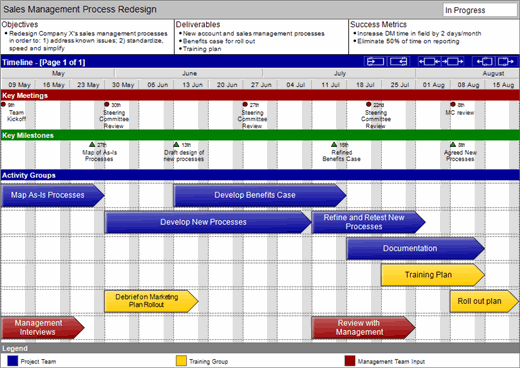
Swiftlight Project Timeline Software - Example 3 Month Project

Click on the link to see a larger image of the above project timeline

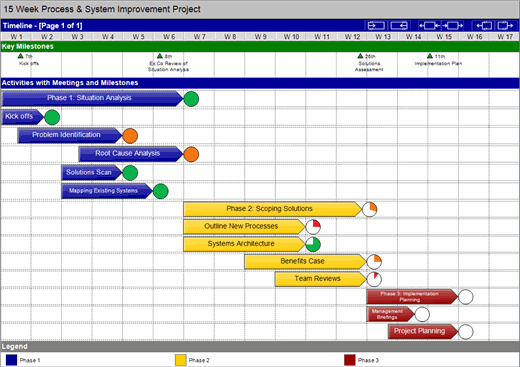
Project Timeline 2: an example Swiftlight Timeline for a 15 week, three phase process and systems improvement project

Swiftlight Project Timeline Software - Example 15 Week Project

Click on the link to see a larger image of the above project timeline

Project Timeline 3: an example Swiftlight Timeline for a product launch showing key activities and milestones over 3 years
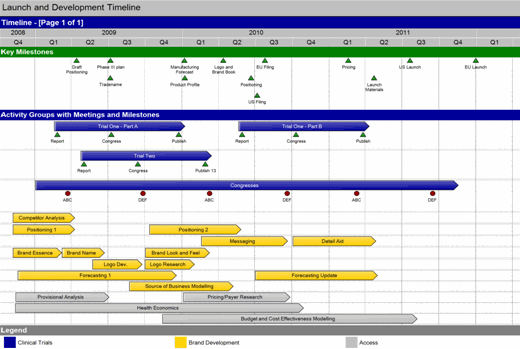
Swiftlight Project Timeline Software - Example 3 Year Project

Click on the link to see a larger image of the above project timeline

Project Timeline 4: An example of the detail that's available for each activity (if you want it!)
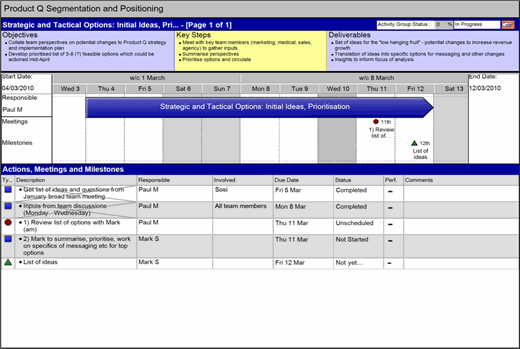
Swiftlight Project Timeline - Detail for One Activity

Click on the link to see a larger image of the above project timeline


Ease-of-Use = Get Going Quickly + No Training Requirement

One of the first things our customers talk about is ease of use. With Swiftlight's intuitive drag-and-drop interface and simple navigation, getting going and creating your first project timeline is incredibly easy. Combine this with our free "3 minute" video tutorials and other support resources, and you'll find there is no need for in-depth training. To see for yourself, why not get a free 30 day trial?


Customize Your Project Timeline's Colors, Fonts & More!

Do you need outputs that are in line with your tastes and / or your company's branding? No problem. Swiftlight's customization capabilities allow you to adapt colors, fonts, terminology, logos.

Swiftlight Project Timeline - Examples in Customized Colors


Next Steps?


What others say:

“Creating and tracking a project is exceptionally easy.”

PCWorld Review
Swiftlight Project Management Software Reviewed by PCWorld

“I love the visual timeline construction and display.”

Stuart Lloyd-Hurwitz
Business Transformation Consultant

Customers in 17 countries including:

Pearson PLC
Siemens
Stanford
AEC Partners
Business Thinking Ltd
Euro Disney
Foresters
Penguin Books
Knowledge Network International
RHR International